AI Construction Scope Generation for General Contractors
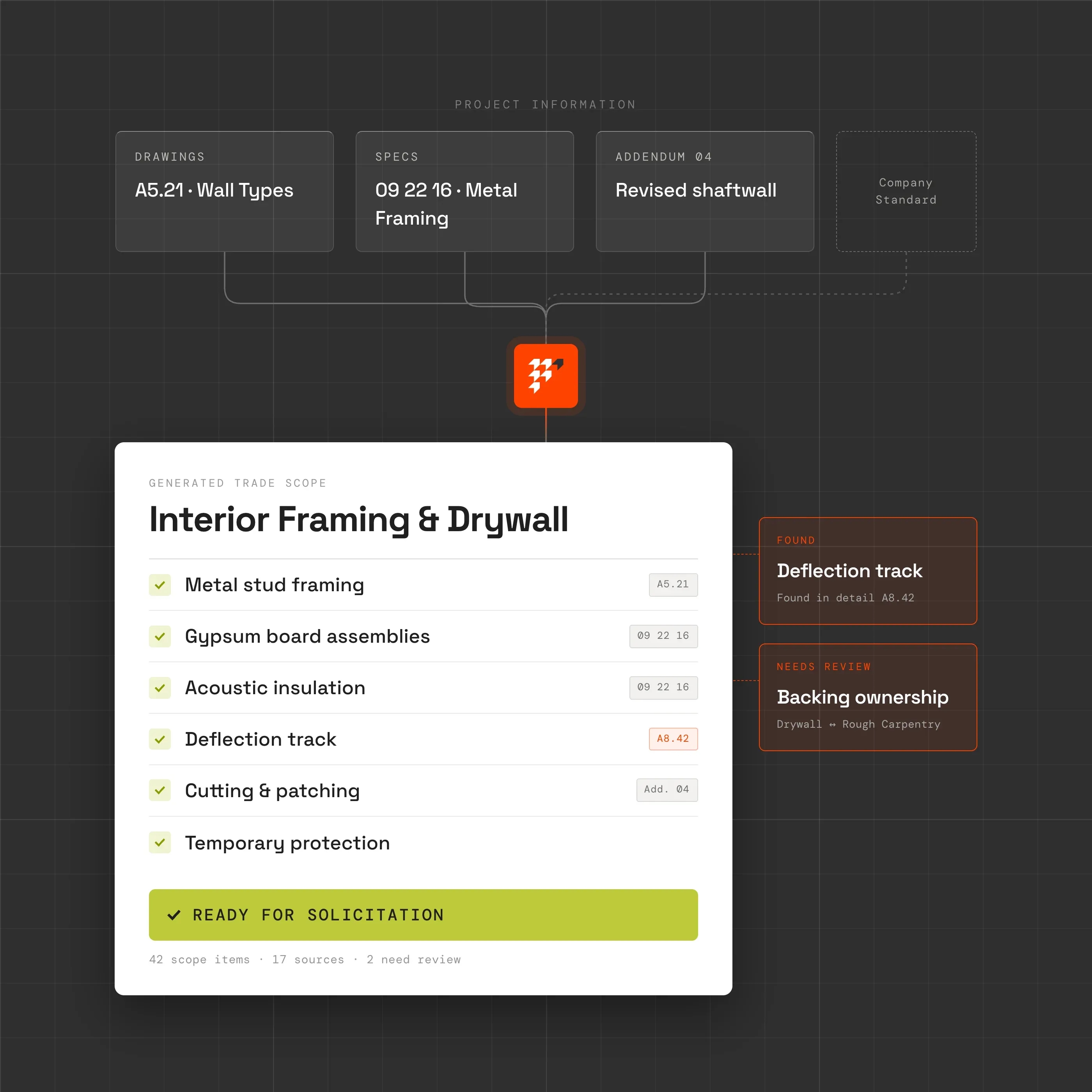
Know exactly what you're asking each trade to carry. Piper turns drawings, specifications, addenda, and company knowledge into trade-specific scopes, so your team can define what is included, clarify boundaries, and catch what still needs attention before bids go out.
The job today
The scope is scattered across the project. Your scope sheet shouldn't be
A complete trade scope rarely lives in one place. Requirements are spread across drawings, specifications, addenda, alternates, owner requirements, and the details experienced estimators know to look for.
Before a package goes out, someone has to pull all of that together and decide what the trade is actually responsible for.
Today
Hours reading across drawings and specs. Old scope sheets copied from previous projects. Trade boundaries depend on who remembers to check them. Requirements buried in notes, details, and general conditions.
With Piper
Project requirements organized by trade. Each scope item linked back to its source. Trade boundaries and unclear responsibilities surfaced for review. Your company standards carried into every new scope.
How scope generation works in Piper
From scattered project requirements to a scope ready for review
- 01. Understand the project
Bring the scope together from across the documents
Piper reviews drawings, specifications, addenda, bid instructions, alternates, allowances, and other project requirements to build a structured picture of the work.
- 02. Organize by trade
Turn project requirements into package-specific scope
Requirements are organized around the trades and work packages that need to carry them, including items that appear across multiple documents or sit between traditional trade boundaries.
- 03. Challenge the scope
Surface what is unclear, missing, or needs a decision
Piper flags uncertain ownership, potential gaps and overlaps, relevant coordination requirements, and items that need estimator judgment before the scope is issued.
- 04. Build the scope sheet
Put the work into your company's format
Generate a trade-specific scope with inclusions, applicable requirements, alternates, allowances, coordination items, and source references, ready for your team to review before solicitation.
More than drawing notes
Build the scope behind the bid package
Trade responsibilities
Included work Trade ownership Furnished-by / installed-by boundaries Potential gaps and overlaps
Project requirements
Drawings Specifications Addenda Owner requirements Alternates and allowances
Coordination scope
Blocking and backing Cutting and patching Sleeves and penetrations Firestopping Controls and connections Testing and commissioning
Project conditions
Phasing Site logistics Temporary protection Hoisting Submittals and closeout Schedule requirements
Every requirement stays connected to the project source behind it
Outcomes
Send better scope out before the bids come back
Start from the project, not the last job
Use the current drawings, specifications, addenda, and requirements as the basis of the scope instead of relying on someone to remember what should be copied from an old package.
Catch the awkward scope between trades
The expensive misses are often not the obvious systems. They are the interfaces: who provides blocking, firestopping, controls integration, testing, patching, temporary protection, or another requirement sitting between packages.
Spend estimator time on judgment
Piper does the extraction and organization so experienced people can spend more time deciding trade boundaries, challenging unclear requirements, and identifying what the documents may not fully resolve.
Give every bidder the same basis
A clearer scope gives subcontractors a more consistent definition of what to price, making the bids that come back easier to compare and level.








Define the work before you ask someone to price it
Build a real trade scope with Piper
Bring drawings and specifications from a current or recent project. See how Piper turns scattered requirements into a trade-specific scope, surfaces unclear boundaries, and keeps every finding connected to its source.
Questions
What preconstruction teams ask
Does Piper just summarize the drawings and specifications?
No. A trade scope is not a document summary. Piper organizes requirements around the work each package needs to carry and helps surface trade boundaries, coordination items, alternates, allowances, and unclear responsibilities that need review.
Is scope generation the same as takeoff?
No. Takeoff tells you how much of something is shown. Scope generation helps determine what work needs to be carried and who is responsible for it. You can have the right quantity assigned to the wrong trade, or a complete-looking quantity with important associated scope missing.
Can Piper use our existing scope sheets?
Yes. Your existing scope structure, standard language, trade breakdowns, and company requirements can become part of how Piper prepares new scopes instead of forcing the team into a generic format.
Does Piper decide which trade owns every scope item?
Not automatically in every case. Clear requirements can be organized into the appropriate package, while ambiguous boundaries or low-confidence assignments are surfaced for estimator review. The consequential scope decision stays with your team.
Can Piper find requirements outside the obvious trade specification?
Yes. Trade obligations can appear in drawings, other specification sections, addenda, general requirements, alternates, allowances, and coordination language. Piper brings those sources together rather than treating one spec section as the entire scope.
What happens when the drawings or addenda change?
The scope should change with the project. When upstream project information changes, affected scope can be surfaced for review rather than leaving the team to remember which scope sheets may now be stale.
Does this connect to bid leveling?
Yes. The issued trade scope becomes part of the basis for evaluating incoming subcontractor proposals. That allows Piper to compare what the bidder submitted against what the team actually intended them to carry.
Keep going
Related workflows
Bid Leveling
Know what you're actually carrying
Explore Bid LevelingFinal Bid Review
Challenge the estimate before you stand behind it
Explore Final Bid Review