For general contractors

One preconstruction system. More ways to put it to work

Built for preconstruction and estimating teams. Piper brings your project information, company knowledge, and preconstruction workflows into one connected system. Start with the job in front of you. As your team uses Piper across more of preconstruction, the same project understanding carries with them.

Available today

Start with the work your team already does

Each Piper workflow is built around a real preconstruction job, not a generic AI prompt. Use one on its own or connect them across the same project.

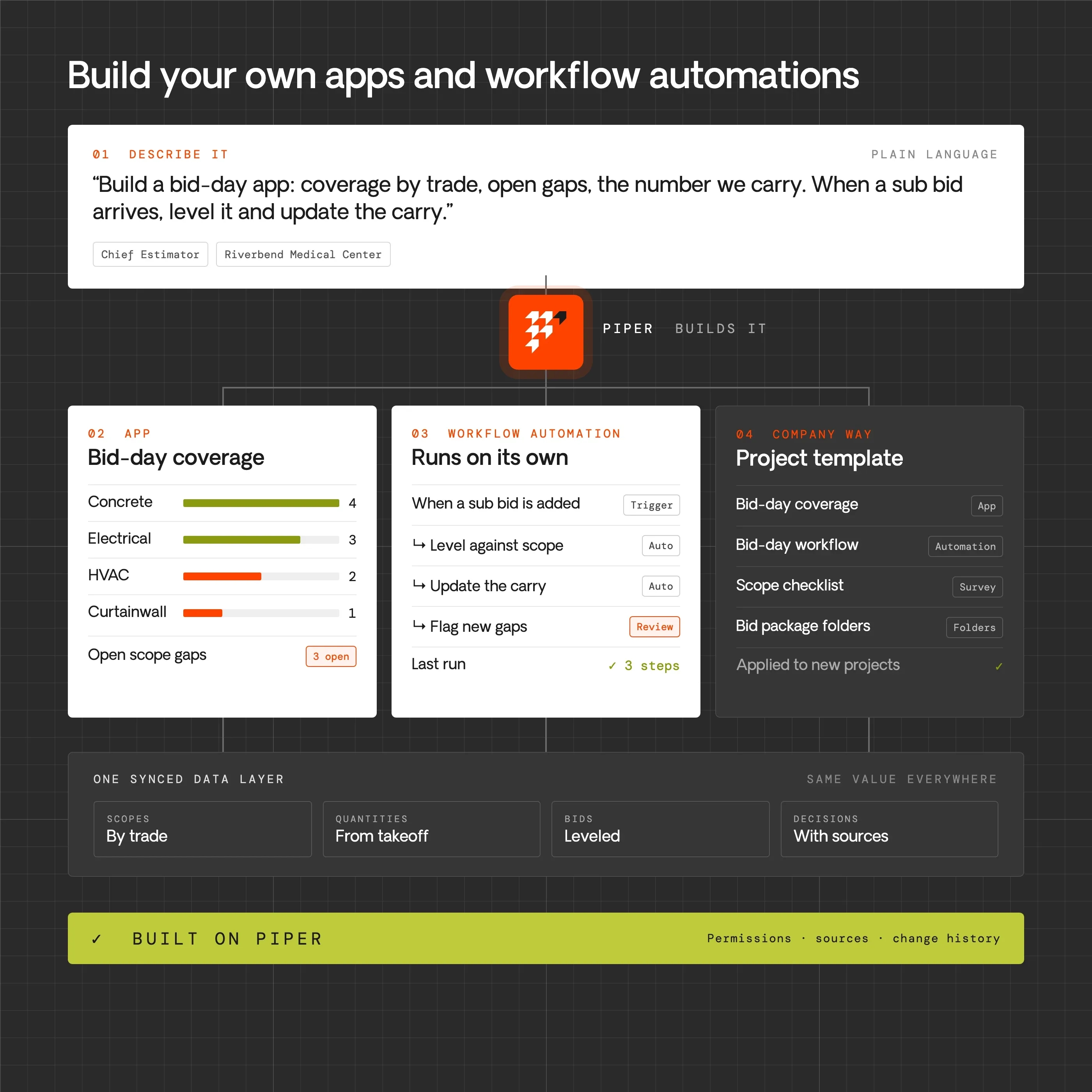
Build with Piper product tile: a team request turned into a bid-day app, a workflow automation that levels each new sub bid and updates the carry, and a company project template, all on one synced project data layer with permissions and sources built in

USE CASE 01

Build with Piper

Build your own construction apps and workflow automations

When your team needs something Piper does not do out of the box, build it on the same project documents, sources, and data.

  • Apps and automations that start out knowing the project
  • Every number traced to the page it came from
  • Connected to your systems and to the rest of Piper
Explore Build with Piper
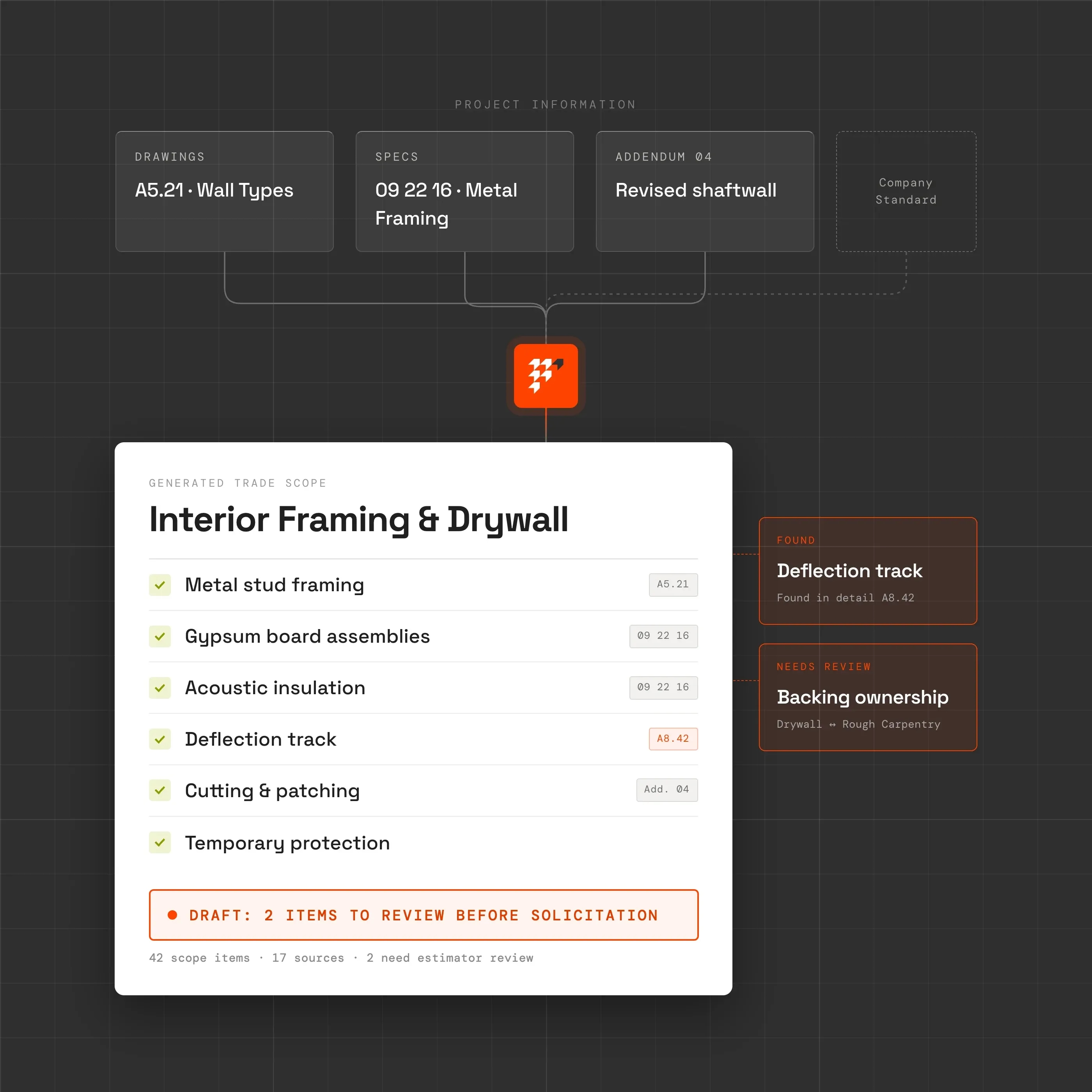
Scope generation product tile: a draft interior framing and drywall scope of work built from drawings, specs, an addendum, and company standards, with two items flagged for estimator review before solicitation

USE CASE 02

Scope Generation

Know exactly what you're asking each trade to carry

Turn drawings, specifications, addenda, and company standards into source-backed trade scopes.

  • Build trade scopes from the project, not from memory
  • Surface unclear boundaries and missing scope before solicitation
  • Keep every requirement linked to its source
Explore Scope Generation
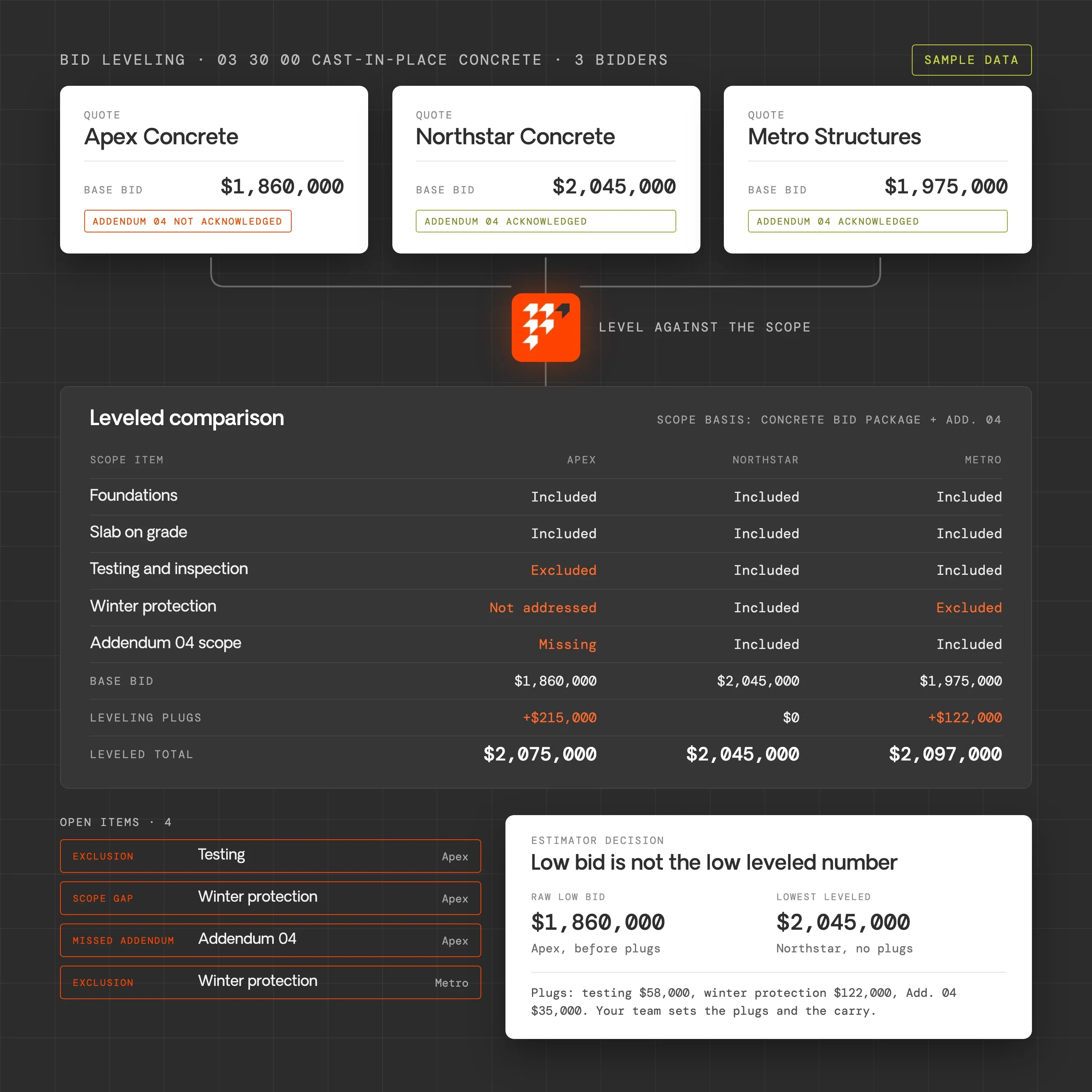
Sample bid leveling for one concrete package: three subcontractor quotes compared against the scope, with exclusions, a scope gap, and a missed addendum flagged, and raw and leveled totals side by side for the estimator to decide the carry

USE CASE 03

Bid Leveling

Know what you're actually carrying

Compare subcontractor bids against the intended scope so the low number does not hide an expensive gap.

  • Compare bids against the scope, not just each other
  • Surface exclusions and gaps before you pick a carry
  • See the leveled number and the evidence behind it
Explore Bid Leveling
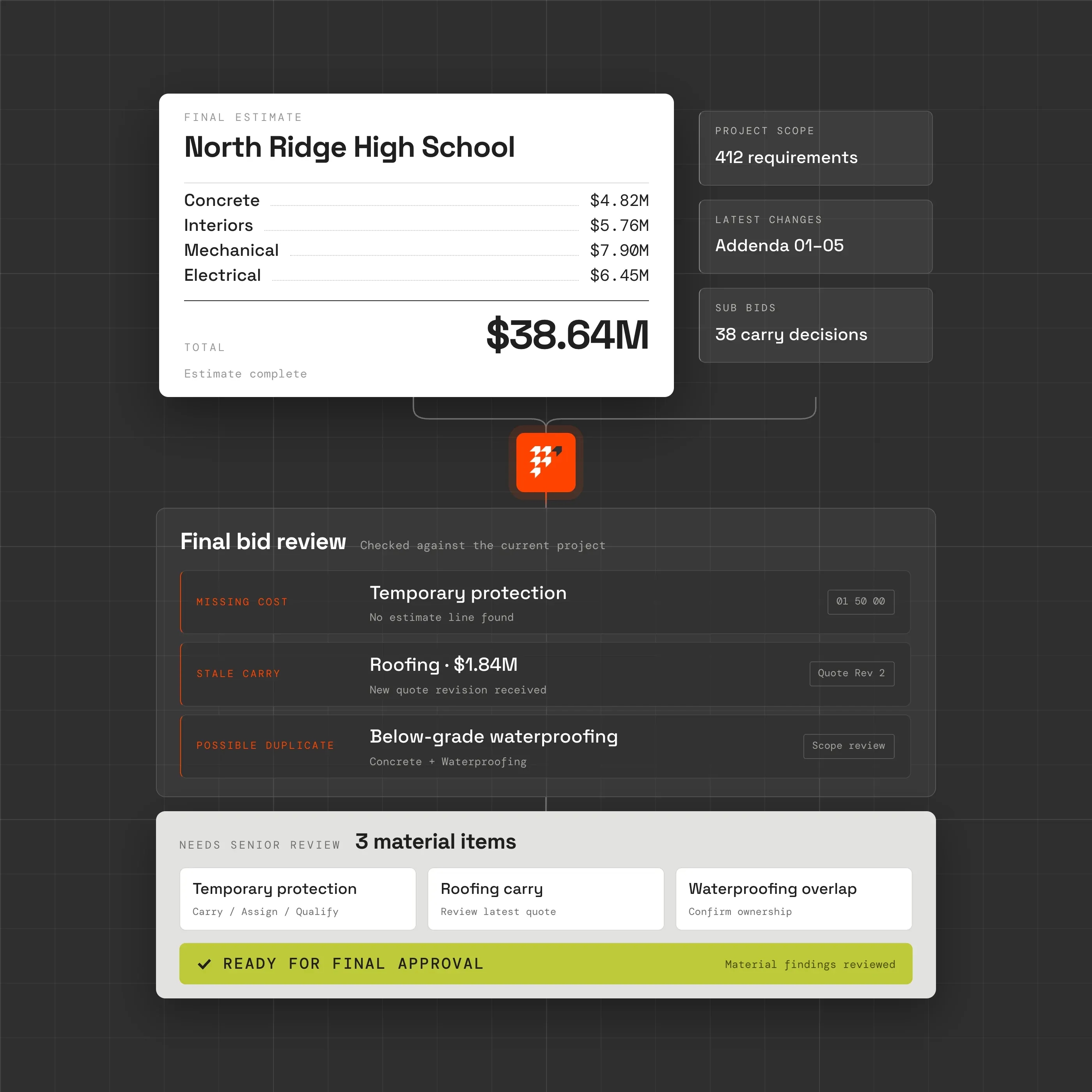
Final bid review product tile: estimate checked against the project for gaps and risk

USE CASE 04

Final Bid Review

Challenge the estimate before you stand behind it

Review the estimate against the project behind it and focus senior attention on what still deserves judgment.

  • Find scope with no cost assigned
  • Catch duplicated or stale carry decisions
  • Focus senior review on what still needs judgment
Explore Final Bid Review
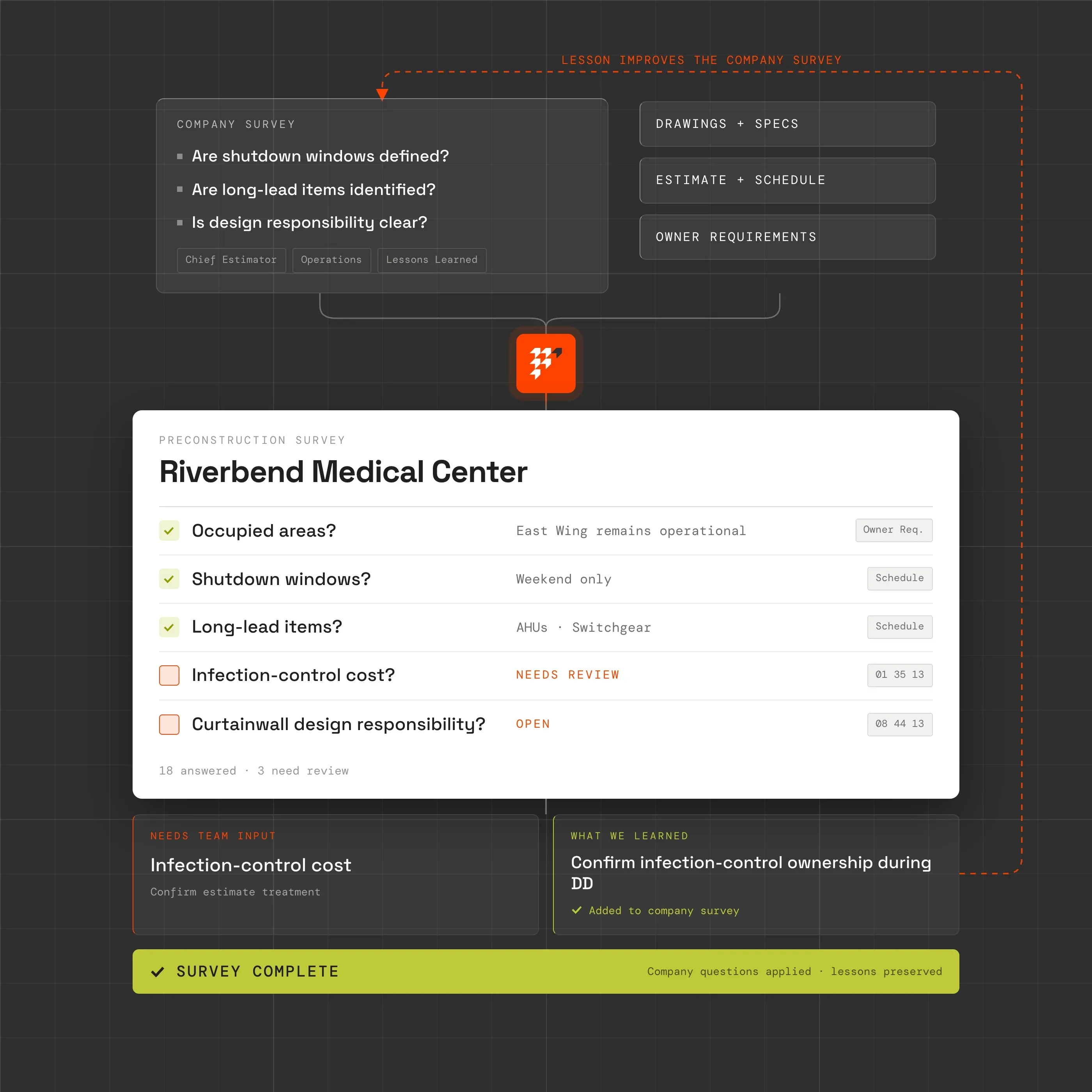
Survey product tile: company checklist applied across a project with open risks flagged

USE CASE 05

Survey

Ask the right questions on every project, and make the next one better

Turn your company's experience into a repeatable survey that captures what the team learns and improves over time.

  • Run your company's best questions on every project
  • Surface unanswered risks before they disappear
  • Turn lessons learned into a process that improves over time
Explore Survey
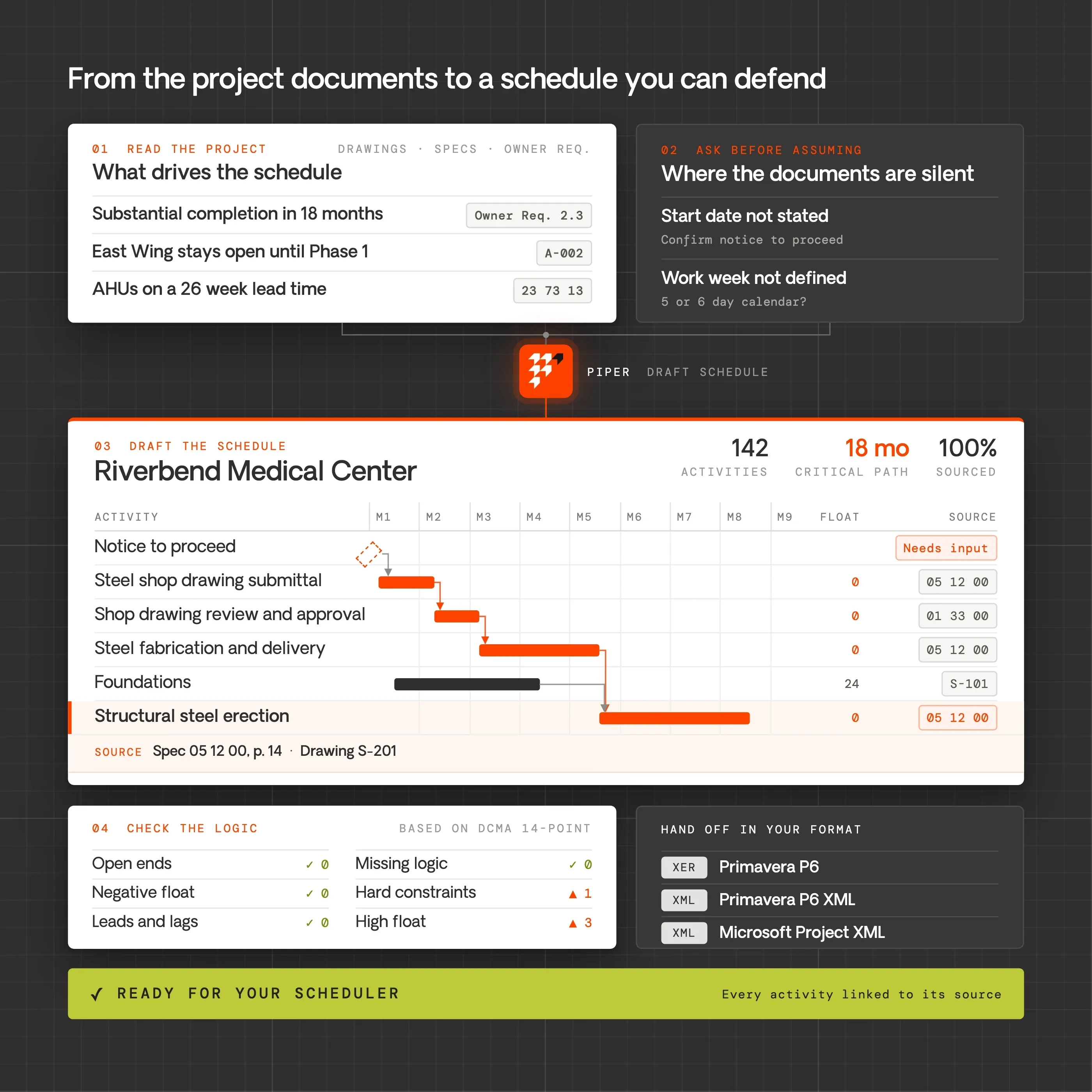
Scheduling product tile: schedule drivers read from the project documents, open questions for the team, a CPM schedule with every activity linked to its source, DCMA-based logic checks, and export to Primavera P6 or Microsoft Project

USE CASE 06

Scheduling

Build the preconstruction schedule from the project, not from a blank page

Draft a CPM preconstruction schedule from the project documents, with every activity linked to its source, and hand it off in P6 or Microsoft Project format.

  • Draft the schedule from the project documents
  • Keep every activity linked to its source
  • Check the logic before it goes out, then export to P6
Explore Scheduling
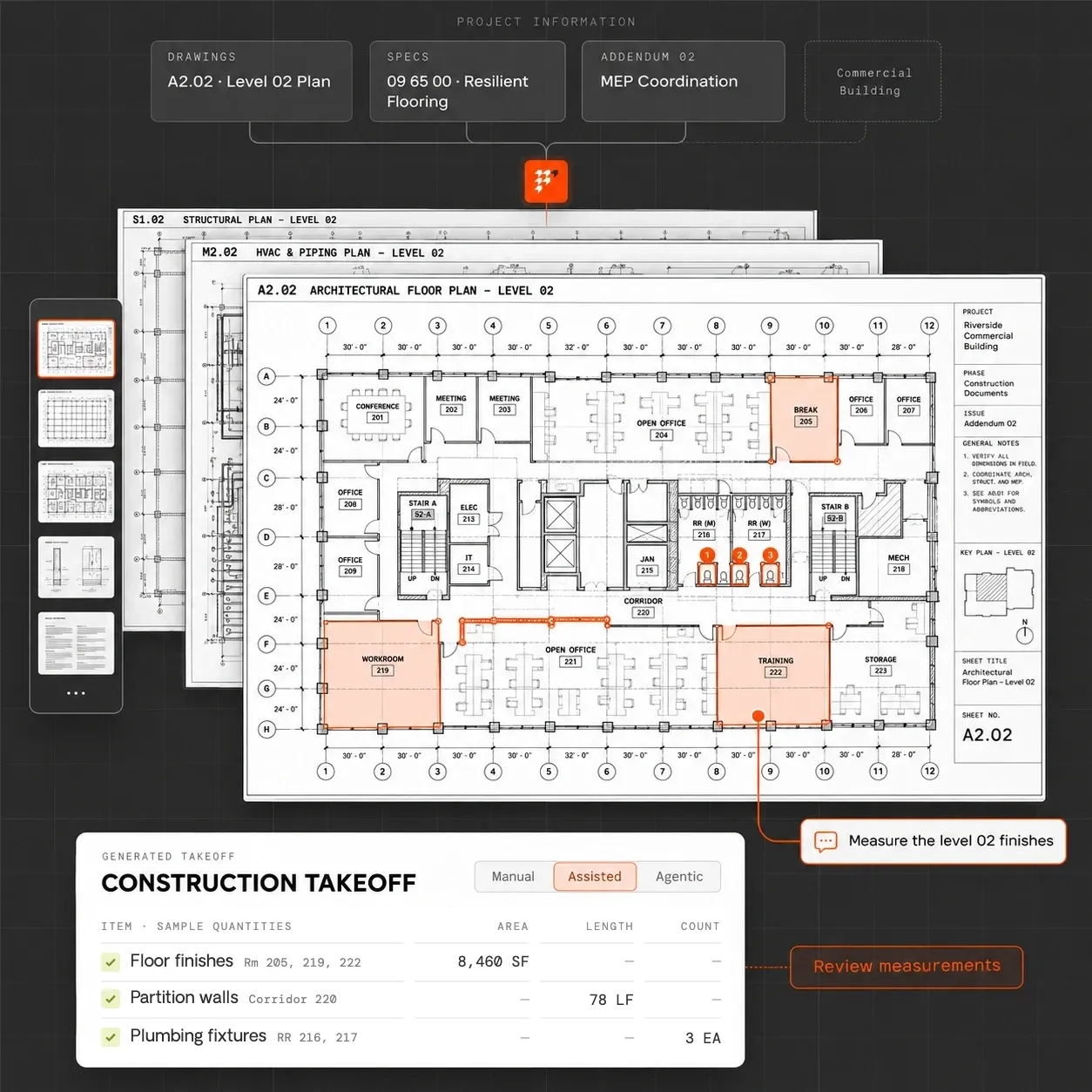
Illustrative takeoff on a commercial floor plan: measured room areas, a partition run, and fixture counts, with a sample quantities panel showing floor finishes in square feet, partition walls in linear feet, and plumbing fixtures by count

USE CASE 07

Takeoff

Turn complex drawing sets into quantities you can check

Measure areas, lengths, and counts manually, with assistance, or through an agent. Keep the measurements editable and on the drawings behind them.

  • Draw, trace rooms, and find similar symbols
  • Ask the agent to build a takeoff you can inspect and edit
  • Group quantities by item and connect your catalogs and pricing formulas
Explore Takeoff

The preconstruction operating system

These aren't separate tools

Every workflow works from the same evolving understanding of the project. Piper connects what is happening on the project now with how your company works and what it has learned before, so each workflow starts with more context than the last.

Live project context

Drawings, specifications, addenda, subcontractor bids, estimates, schedules, clarifications, and decisions stay connected as the project changes.

Company knowledge

Templates, standards, historical work, review questions, and lessons learned become part of how the work gets done, not information someone has to remember to search for.

Construction workflows

The apps and automations your team builds, takeoff, scope, leveling, review, surveys, scheduling, and the workflows Piper adds next all operate on top of that shared understanding instead of starting from scratch.

Why it matters

A decision in one workflow rarely stays in one workflow

An addendum changes a requirement. That requirement may affect the trade scope. The changed scope may affect a subcontractor bid. That may change the number you carry. And that may create something the final reviewer needs to see.

Piper keeps the work connected

01

Scope changes

→ affect what bidders should carry

02

Bid decisions

→ affect what enters the estimate

03

Project changes

→ surface work that may now be stale

04

Reviews and lessons

→ improve how the next project is handled

The more of preconstruction your team runs through Piper, the more useful the shared project and company context becomes.

Built to expand with your process

Build on the work your team does today

Takeoff, Scope Generation, Bid Leveling, Final Bid Review, Survey, and Scheduling are places teams can put Piper to work today. Beyond them, your team can build its own construction apps and workflow automations on the same project data with Build with Piper, without creating another disconnected point solution.

Start with one workflow. Bring the project with you

See Piper on your project

Bring a current or completed project and see how Piper connects project information, company knowledge, and preconstruction workflows around the work your team already does.