
Build Your Own Construction Apps and Workflow Automations (2026)
When your team needs something Piper doesn't do out of the box, build it. Your apps and automations start from what Piper already knows: every drawing, spec, and addendum read in full, every number traced to its source, your systems connected, and the same project data the rest of the team works on.
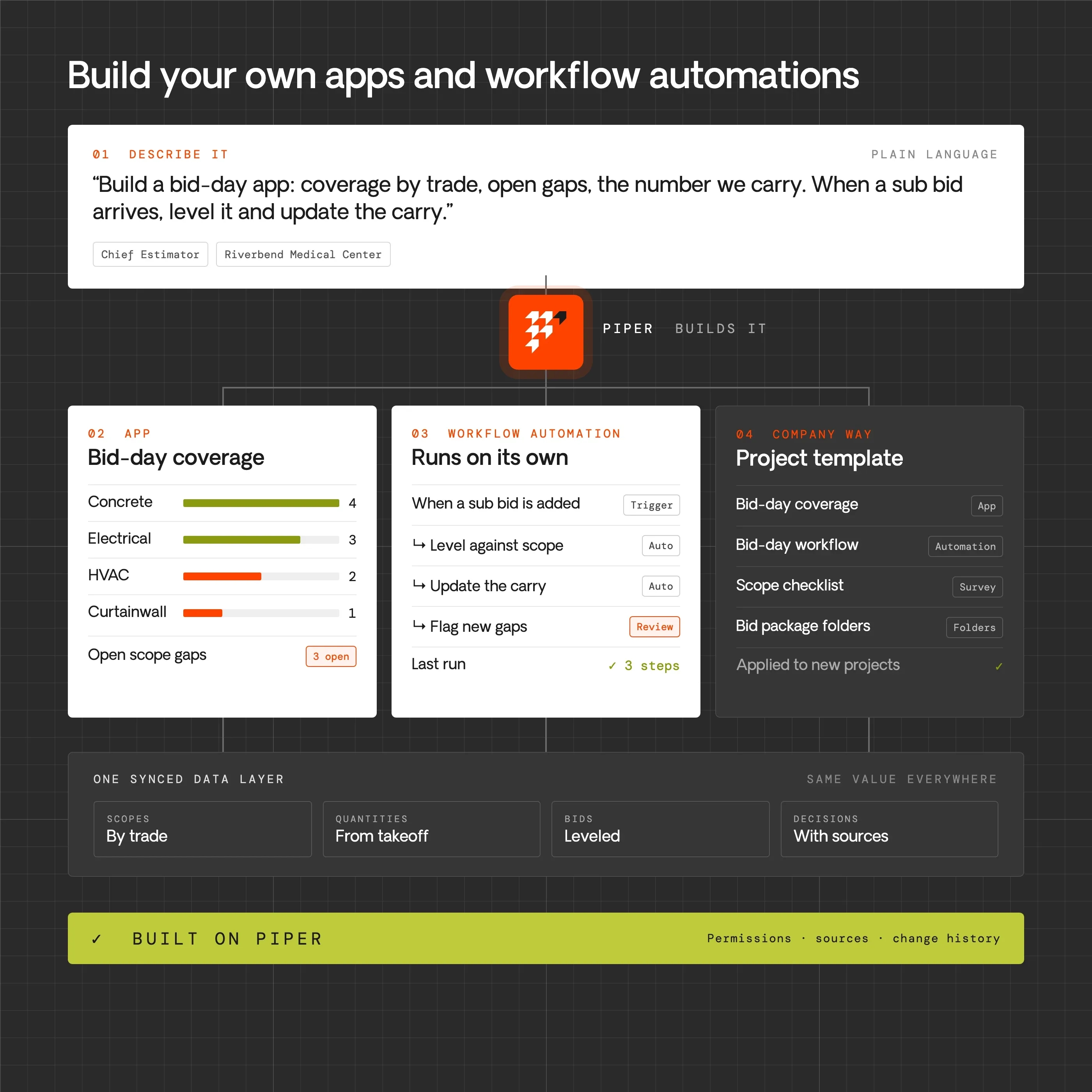
The job today
Your team already builds its own tools. They end up on islands
Every preconstruction team has builders: the estimator with the macro-heavy workbook, the manager with a tracking spreadsheet, the early adopter trying general AI app builders. Those tools work until they need the project documents, the latest numbers, permissions, a security review, and someone to keep them running.
Each one becomes another point solution with its own copy of the data, and its builder becomes its support desk.
Today
A separate app or spreadsheet for every idea. Project data copied in by hand, stale the next day. No link from a number back to the document behind it. The tool stops working when its builder moves on.
With Piper
Describe what you need, and Piper builds it. It reads the drawings, specs, and addenda from day one. Every number links to the page it came from. Piper runs, secures, and maintains the platform underneath.
How building works in Piper
From an idea to a tool the whole team can use, on data it already trusts
- 01. Describe it
Say what you need
Ask in plain language for a bid tracker, a coverage dashboard, a scope register, or work that should happen every time a sub bid or an addendum arrives. Piper asks where the request is unclear instead of guessing.
- 02. Start from the project
It already knows the job
What you build reads the same project Piper reads: bid packages of thousands of pages, revisions and addenda, quantities from takeoff, scopes, bids, and decisions. No exports, no copy and paste.
- 03. Automate the work
Workflow automations that run on their own
Have work happen when something changes: level a sub bid when it arrives, review an addendum against the scopes it affects, run your company checks on every new project. One step can hand off to the next.
- 04. Make it the company way
Roll it out to every project
Add what works to your company templates so every new project starts with it. Everyone keeps their own way of working, on the same live numbers.
What you build on
Start from construction, not a blank app
Construction documents
Bid packages of thousands of pages Drawings, specs, and addenda Revision-aware reading
Source tracing
Every number linked to its page Quotes checked against sources Low confidence flagged
Construction technology
Computer vision for takeoff Excel-compatible calculations CPM scheduling engine
Integrations and security
Integrations with your systems Permissions by project and role SOC 2 Type II
You build the construction work. Piper runs the platform underneath
Outcomes
Build like a platform, not a pile of point solutions
Everyone works their own way
The senior estimator stays in Excel, the early adopter builds a tool, the manager reads a dashboard, all on the same live numbers instead of four stale copies.
What you build connects to the rest
Every app and automation lands on the same project data, sources, and permissions, so it connects to everything else instead of becoming one more island.
Piper finds what to build next
Piper reviews the work across your team, flags double work and contradicting assumptions, and proposes automations worth adding. A person approves each one.
No builder becomes the support desk
Piper runs, monitors, secures, and upgrades the platform. Your builders spend their time on how your company works, not on keeping a tool alive.










Keep building. Build on a platform that knows construction
Build with Piper
Bring a workflow your team runs by hand today, or a tool someone built on the side. See how Piper turns it into an app or a workflow automation on your project data, with sources and permissions built in.
Questions
What builders and IT ask
Do we need to know how to code?
No. Describe what you need in plain language, and Piper builds and changes it. You review the result like any other file in your workspace.
What can we build?
Dashboards and trackers, forms and registers, workflow automations that run when something changes, Excel workbooks, Word and PowerPoint templates, and company project templates. Everything lives in your workspace, with the same permissions and history as the rest of Piper.
How is this different from a general AI app builder?
A general app builder produces a standalone app with its own data, login, and security to review, and it knows nothing about construction. On Piper, what you build starts from the project documents, company knowledge, source tracing, and permissions that are already there, and connects to everything else your team does.
Can something we build break our project data?
Rules on project data apply to every change, whether it comes from a person, a spreadsheet, an app, or the agent. Using a tool and changing it are separate permissions.
Who maintains it?
Piper runs, monitors, and upgrades the platform. Your team owns what it builds and can ask Piper to change it at any time. As the platform grows, what you built gains new capabilities.
Does it connect to our other systems?
Yes. Piper integrates with the document, email, and bid management systems construction teams use, and adds new integrations all the time. Files that come in land as native, AI-ready files.
What if Piper can't do something yet?
Ask anyway. When Piper cannot do something, the gap goes into our product process, and new capabilities and integrations are built on request.
Keep going
Related workflows
Survey
Ask the right questions on every project, and make the next one better
Explore SurveyBid Leveling
Know what you're actually carrying
Explore Bid Leveling