AI Preconstruction Scheduling for General Contractors
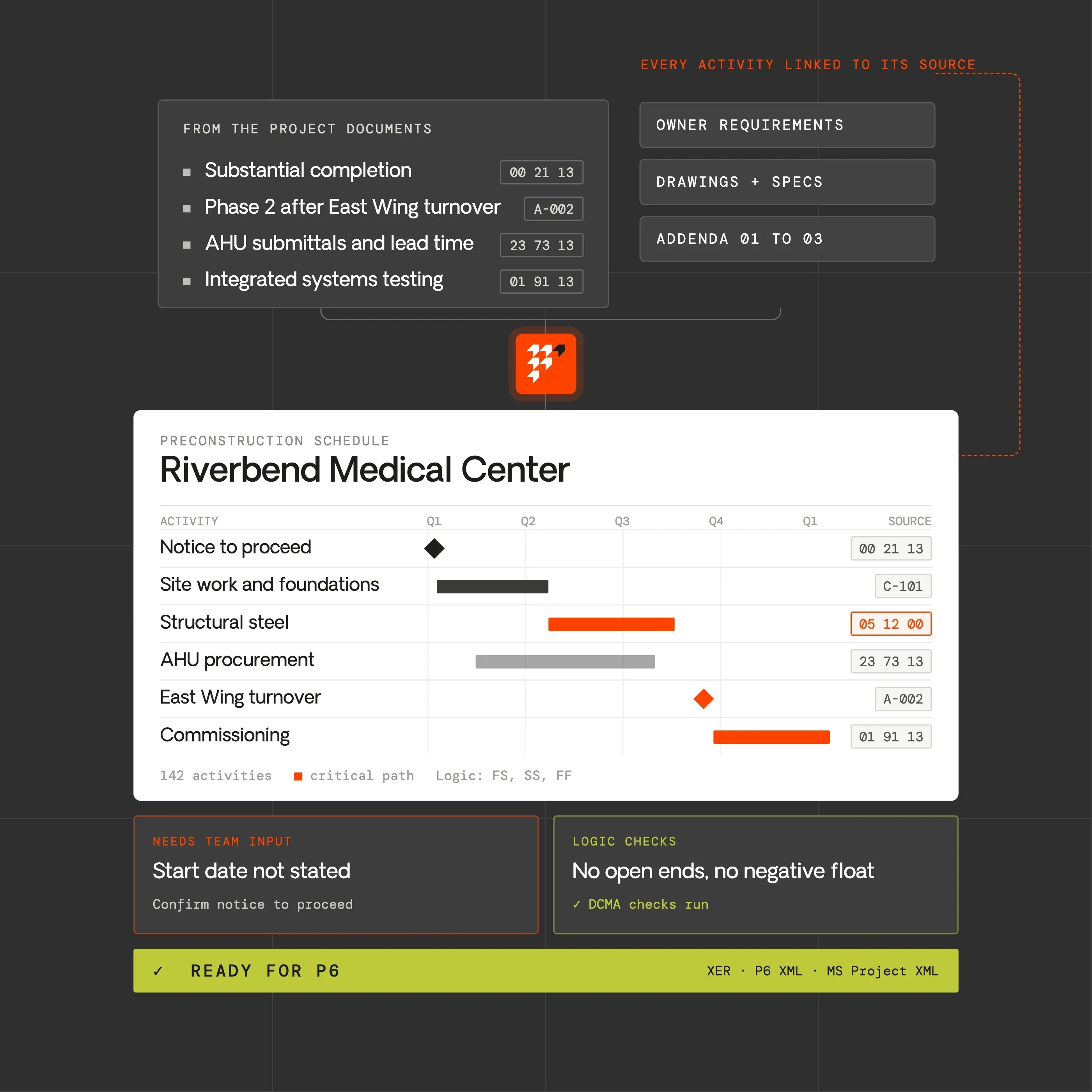
Build the preconstruction schedule from the project, not from a blank page. Piper drafts a CPM schedule from the drawings, specifications, and project documents, links every activity to its source, and checks the logic before you export it to Primavera P6 or Microsoft Project.
The job today
Precon needs a schedule. Someone still has to build it
In preconstruction, the schedule shapes the estimate: general conditions, phasing, long-lead procurement, and the dates the owner holds you to. The logic behind it lives in the same documents as the scope: milestones in the owner requirements, phasing on the drawings, submittal and commissioning requirements in the specifications.
Someone has to read all of that, turn it into activities and logic, and get it into the format the owner asks for, usually on the same deadline as the estimate.
Today
A schedule built late, after the estimate is mostly done. Milestones and phasing pulled from the documents by hand. Waiting on a scheduler or PM who is already on other work. Excel workarounds that P6 rejects on import.
With Piper
A first draft built from the project documents. Every activity linked to the page it came from. Questions asked where the documents are silent, not guessed. Native P6 and Microsoft Project files, ready to open.
How scheduling works in Piper
From the project documents to a schedule your scheduler can stand behind
- 01. Read the project
Find what drives the schedule
Piper reviews the drawings, specifications, addenda, and owner requirements for milestones, phasing, required durations, long-lead items, submittals, commissioning, and other constraints on the work.
- 02. Ask before assuming
Fill the gaps with your team, not with guesses
Where the documents do not say, such as the start date, the work week, or how a phase should sequence, Piper asks instead of inventing an answer.
- 03. Draft the schedule
Build activities, logic, and a WBS with sources
Piper drafts the WBS, activities, durations, and relationships, calculates the critical path and float, and links each activity to the document and page it came from.
- 04. Check and export
Review the logic, then hand it off in your format
Run quality checks based on the DCMA 14-point assessment, edit in the activity table and Gantt, and export to Primavera P6 (XER or XML) or Microsoft Project XML.
Review, not just build
Check a schedule before it carries your name
Schedule logic
Open ends Missing logic Relationship types
Leads, lags, and constraints
Leads Lags Hard constraints
Float and durations
Negative float High float Long durations Critical path
Schedules from others
Primavera P6 XER Primavera P6 XML Microsoft Project XML
Every finding points to the activity behind it
Outcomes
Plan the job with a schedule you can defend
Start from this project's documents
Milestones, phasing, and requirements come from the current project documents, not from a schedule copied from a similar job and edited until it looks right.
Answer the reviewer with a source
When the owner or a teammate asks why an activity is there or why a milestone falls where it does, the source document is one click away.
Keep the scheduler on judgment
Piper does the reading and the first draft, so the person who owns the schedule spends their time on sequence, durations, and risk: the decisions that need experience.
Hand it off in the format the owner asks for
The schedule opens in Primavera P6 or Microsoft Project with its activities and logic intact, ready for your scheduling team or the owner.








Put a schedule behind the estimate, not just a number
Build a preconstruction schedule with Piper
Bring the project documents from a current or recent project. See how Piper drafts the schedule, links every activity to its source, checks the logic, and hands it off in P6 or Microsoft Project format.
Questions
What preconstruction teams ask
Does Piper replace Primavera P6 or Microsoft Project?
No. Piper builds and checks the preconstruction schedule, then hands it to the tools your schedulers already use. It imports and exports P6 XER, P6 XML, and Microsoft Project XML. It works with Microsoft Project XML rather than .mpp files.
Will Piper make up dates or durations?
Piper does not invent a start date or a milestone the documents do not state; it asks. Durations are a proposed starting point for your team to review and adjust, and every activity shows the source behind it.
Can Piper review a schedule we didn't build?
Yes. Import a P6 or Microsoft Project file and run the same logic checks on it.
Does Piper run the full DCMA 14-point assessment?
It runs the checks that apply to a preconstruction schedule. Checks that need progress data or a baseline, such as the baseline execution index, apply once a project is underway.
Can we edit the schedule in Piper?
Yes. Change activities, logic, calendars, and constraints in the activity table or the Gantt, recalculate to see the critical path, or ask Piper to make the change in plain language.
Does this replace our scheduler?
No. Piper drafts and checks; the scheduler owns the logic, the durations, and the final schedule.
Keep going
Related workflows
Scope Generation
Know exactly what you're asking each trade to carry
Explore Scope GenerationFinal Bid Review
Challenge the estimate before you stand behind it
Explore Final Bid Review